After getting caught flat-footed by ChatGPT and others, Google closed the AI gap in 2025 and has now turned its attention to commercializing its LLM products and tools. While some of these capabilities have existed in other platforms and partner solutions, Google Ads has now woven native AI into almost every aspect of the platform, from targeting and bidding to creative production and campaign management.
For marketers, this means our role is shifting from manual campaign operator to strategic decision-maker. Allowing AI to handle more of the execution enables us to set the direction, think about higher-level questions, and not worry as much about the minutiae. Or at least that’s the sales pitch, but as every seasoned marketer knows, there will never be a shortage of work to be done. Advanced audience creation using third-party tools, high volume of creative refreshes to avoid ad fatigue and increase CTR, A/B tests on campaigns for incremental gains, CRO on landing pages for conversion improvement, custom report building and presentation, and custom content creation for campaigns in an ABA approach are all things that require a human in the loop for successful B2B advertising.
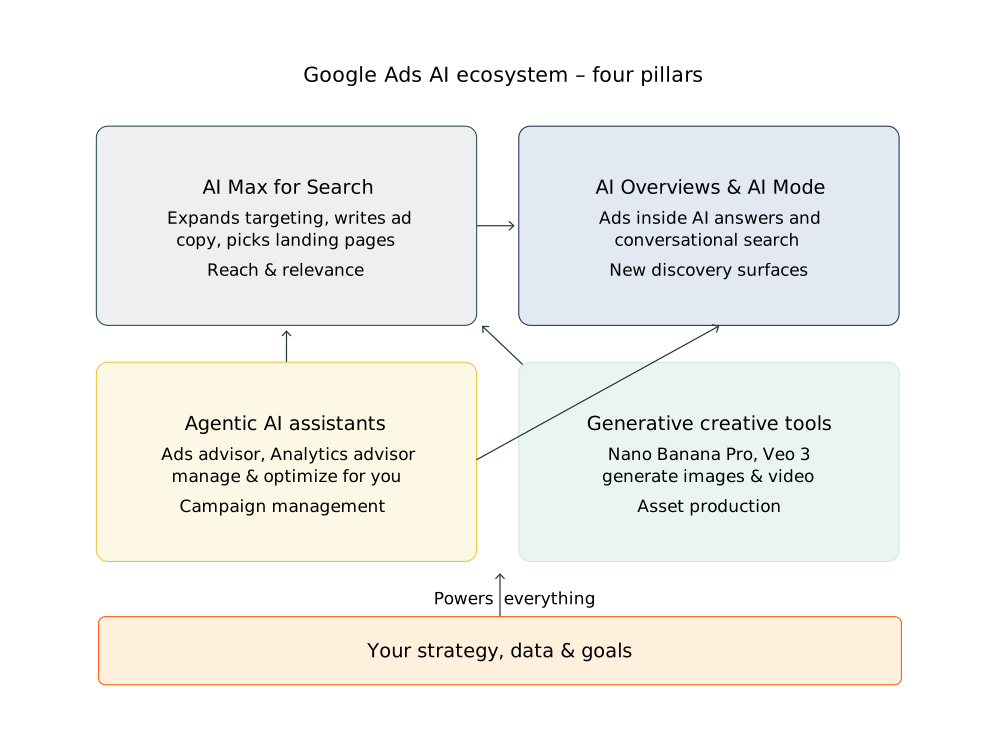
Here’s what you need to know about the four most important AI-powered features in Google Ads right now.
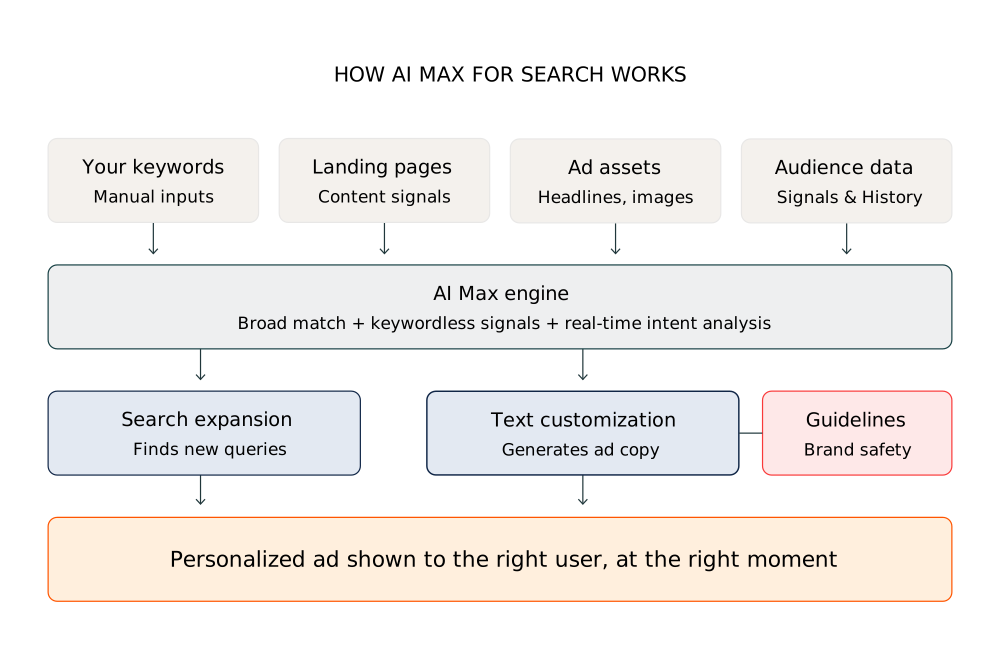
AI Max for Search
AI Max isn’t a new campaign type despite the Max nomenclature, it’s a set of AI features you switch on inside your existing Search campaigns. Once enabled, it expands your targeting beyond your keyword list using broad match and keywordless signals, generates ad headlines and descriptions on the fly to match each search, and dynamically selects the best landing page for each user’s intent. As of February 2026, Google also rolled out text guidelines globally, letting you define words the AI must never use and provide natural-language brand voice instructions.
AI Max for Search works best for B2C advertisers because the feature relies on high conversion volumes and broad audience pools to train Google’s AI effectively, conditions that consumer brands naturally meet but most B2B tech companies don’t. In niche B2B markets, the algorithm tends to expand into irrelevant queries, the automated copy often lacks the precision sophisticated buyers expect, and the long, complex sales cycles make attribution unreliable. Real-world B2B results have largely been flat or negative on direct performance metrics. That said, there’s one strategic reason not to ignore it entirely: AI Max is currently the only way to get ads placed in Google’s AI Overviews and AI Mode results, so for B2B tech brands prioritizing visibility in AI search, enabling it selectively may be worth the tradeoff.
Advantages of AI Max for Search:
- Campaigns using Smart Bidding Exploration see an average 18% increase in unique converting query categories and 19% more conversions
- Dynamic text customization keeps ads relevant across a wider range of queries without writing dozens of variations manually
- Text guidelines give marketers control over brand safety in AI-generated copy
Disadvantages of AI Max for Search:
- Relevance drift is common; AI Max can and will match your ads to loosely related queries that don’t convert well
- You can’t fully preview every headline and description combination, creating compliance risk in regulated industries
- Strategic overlap with Dynamic Search Ads and Performance Max can lead to campaigns competing against each other
Considerations for AI Max for Search:
- Use Google’s built-in experiment feature to run a 50/50 split test on one campaign for four to six weeks before scaling
- Monitor your search terms report daily during the first two to four weeks and add negative keywords aggressively
- If you’re in a regulated vertical, have compliance review your text guidelines setup before launch
AI Overviews and AI Mode Ad Placements
At long last the wait is over, Google’s AI-generated summaries (AI Overviews) and conversational search interface (AI Mode) now support ads. In AI Overviews, ads appear above, below, or within the AI-generated answer. In AI Mode, ads fit naturally into the conversation when a product or service is relevant. New formats include sponsored retail listings and Direct Offers, and Google’s Universal Commerce Protocol (UCP) which will let shoppers buy directly inside AI Mode from major retailers.
AI Overview and AI Mode ad placements have a catch for B2B tech advertisers. AI Overviews and AI Mode are designed to give users fast, synthesized answers — which means they’re built for informational, research-stage queries, not the high-intent, bottom-of-funnel searches where B2B paid search typically earns its keep. A VP of Infrastructure evaluating enterprise data platforms isn’t likely to convert from an ad tucked into an AI-generated summary; they’re deep in a multi-stakeholder buying process that requires multiple touchpoints, demos, and procurement cycles. There’s also the zero-click problem, AI Mode is specifically designed to keep users in the results page, which means even if your ad appears, the likelihood of a meaningful click-through to a landing page is lower than in traditional search. For B2B tech brands where every lead matters and CAC is high, paying for impressions in an environment optimized for quick answers rather than considered purchases is a questionable use of budget — at least until Google provides clearer performance data specific to B2B buying behavior in these placements.
Advantages of AI Overviews and AI Mode Ad Placements:
- Ability to reach users in discovery and research phases allowing broader, earlier-stage intent than traditional keyword searches
- UCP-powered checkout compresses the path from discovery to purchase into a single session for Ecommerce retailers
- Lead Generation may be able to gain visibility lost to AI Overviews that often cannibalize research queries that drove resource downloads
Disadvantages of AI Overviews and AI Mode Ad Placements:
- No ability to bid specifically for AI Overview or AI Mode placements in Google Search Ads, and very limited performance metrics for these impressions
- AI Max is currently the only way to get ads placed in Google’s AI Overviews and AI Mode results, so for B2B tech brands prioritizing visibility in AI search, enabling it selectively with tight guardrails may be worth the tradeoff.
- Attribution is challenging similar to Display, where users may absorb your brand information in the AI summary and convert later through a different channel
- Ad format and positioning are still evolving, making it hard to understand how your brand was shown and optimize accordingly
Considerations for AI Overviews and AI Mode Ad Placements:
- Focus on strong fundamentals: high-quality landing pages, accurate product feeds, tight conversion tracking, and automated bidding
- Understand the value of scale when assessing ROI. Immediate direct returns may be low, but volume and brand awareness could have long-term benefits
- Google has signaled that dedicated controls and reporting for these placements are on the roadmap, so monitor closely and approach with caution if appetite for testing is limited.
Agentic AI Assistants
Google has introduced AI assistants that sit inside the platform and can actively help manage campaigns. Ads Advisor generates keyword suggestions, drafts creative assets, surfaces performance signals, and proposes optimizations. Analytics Advisor lets you ask performance questions in natural language and get structured answers without building custom reports. Google Ads Manager also includes conversational tools for querying data in plain language.
The core risk with agentic AI assistants inside Google Ads is that they’re optimizing for the outcomes Google defines as success, which don’t always align with what’s actually valuable to your business. They can make autonomous changes to bids, budgets, keywords, and ad copy faster than any human can review them, and in a B2B context especially, a seemingly small misstep like targeting the wrong audience segment or generating off-brand copy can be expensive and hard to reverse. There’s also an accountability gap: when an AI agent makes a decision that tanks performance, it’s genuinely difficult to diagnose why it happened or prevent it from happening again, since the decision logic isn’t fully transparent. The more you hand over to autonomous agents, the more you trade control for convenience, which is a fine deal when the AI is right, and a costly one when it isn’t.
Advantages of Agentic AI Assistants in Google Ads:
- Potential time savings, where tasks that took thirty minutes of report-pulling can be answered in a single query
- Proactive issue detection catches budget pacing problems and performance dips in real time
- Serves as a useful first layer of analysis, freeing strategists to analyze deeper questions
Disadvantages of Agentic AI Assistants in Google Ads:
- Like all AI agents, these tools can be wrong, and when combined with marketing budgets, mistakes translate into very real dollars lost to error
- Verifying an agent’s response can often take just as long as doing the work yourself, and when client budgets are at stake, putting your faith in the bot is not an option
- Over-reliance is a real risk, accepting every suggestion without evaluating it against your specific business context can lead to Google Ads optimising toward Google’s goals, not your own
- Suggestions and analysis are often generic to the point of being unhelpful; marketing professionals will expect a deeper level of understanding of their programs than these tools currently deliver
Considerations for Agentic AI Assistants in Google Ads:
- Treat these agents as a co-pilot, not autopilot. Always review their work and understand their suggestions.
- Start small and grow incrementally with what tasks are best delineated to the agents. Verify what is repeatable and effective and don’t let AI babysitting turn into a time sink.
Generative Creative Tools
Google’s Asset Studio now includes generative AI tools for creating and editing images and videos directly within Google Ads. Nano Banana Pro generates photo-realistic product images, creates lifestyle scenes with up to five products, and applies edits from natural-language prompts. Veo 3 produces studio-quality video assets in minutes. And best of all both tools are free for all Google Ads users.
Google’s Asset Studio is genuinely useful for teams that need to move fast and don’t have a dedicated creative resource. It can rapidly generate image and video ad variants, resize assets across formats, and help fill creative gaps without a full production cycle. But the quality ceiling is noticeable. The outputs tend toward generic, stock-feeling visuals that work reasonably well for B2C brands selling tangible consumer products, where eye-catching imagery matters more than nuance, but fall flat for B2B tech companies whose credibility depends on precise, sophisticated messaging and design.
Getting anything close to on-brand typically requires significant prompt iteration and manual refinement, which eats into the time savings that made the tool appealing in the first place. There’s also a deeper strategic issue: in B2B tech, creative isn’t just decoration, it’s a trust signal. A prospect evaluating an enterprise AI platform who encounters a visibly AI-generated, generic-looking ad may actually form a negative impression of the brand — the opposite of what a brand awareness investment is supposed to achieve.
Advantages of Generative Ad Creative in Google Ads:
- Dramatically reduces the cost and time of professional creative production, especially valuable for small and mid-sized businesses
- Enables rapid A/B testing of multiple creative variations driven by performance data
- Opens up YouTube and Connected TV advertising to brands that previously couldn’t justify video production costs
Disadvantages of Generative Ad Creative in Google Ads:
- Output still requires human review, subtle errors in product details, shadows, or composition can slip through
- If every advertiser uses the same tools, there’s a risk of visual sameness that undermines brand distinctiveness
- The legal landscape around AI-generated commercial imagery is still evolving, particularly for regulated industries
Considerations for Generative Ad Creative in Google Ads:
- Use generative tools as a starting point, not a finish line. Combine AI-generated drafts with human creative direction
- Consult your legal team before relying on any AI-generated creatives and understand your company policies.
- Use original images and videos whenever possible, especially on social channels. Backlash against overt AI content is very real and can create many more problems than it solves when used unnecessarily.
The Future of AI Features in Google Ads is Bright
Google’s incentives here are worth being clear-eyed about. Every one of these AI features lowers the barrier to entry for running ads, making it easier for more businesses to spend more money on Google’s platform. That’s good for Google’s bottom line, and there’s nothing wrong with acknowledging it. But easier to start doesn’t mean easier to succeed. The same automation that removes friction for a first-time advertiser can quietly erode performance for an experienced one who stops paying attention. These features work best when a skilled marketer is in the driver’s seat — setting clear objectives, feeding in quality data, establishing guardrails, and reviewing outputs with a critical eye. The advertisers who thrive won’t be the ones who hand over the controls and trust the algorithm; they’ll be the ones who use these tools to eliminate busywork while staying firmly accountable for strategy, audience judgment, and creative quality. More AI assistance in Google Ads is inevitable.
If you’re a B2B tech or AI company navigating Google’s fast-changing AI ad ecosystem and want a team that knows how to get the most from these tools without losing control of your brand or budget, learn more about our PPC services here.
About the Author

Patrick Brady is the Director of Paid Media at Firebrand. With over 15 years of experience he helps lead digital clients through the ever changing world of online advertising. Prior to Firebrand, he led PPC efforts for multiple Fortune 500 companies across the B2B and B2C space.